What is Discord?
Discord is a social tool that allows users to build communities (known as servers) and send direct messages to their friends. It’s designed to be a much more gaming-focused, casual experience than its buttoned-up business counterpart, Slack. Since the COVID-19 pandemic severed in-person gatherings, it’s become a popular hangout spot among children, teens, and adults alike.
Why are Kids Using Discord?
As a caveat, it’s important to note that many, if not all, online forums, services, and applications require children to be over the age of 13. This is to respect the Child Online Privacy Protection Act, which protects children from having their data exploited online. Discord also requires all accounts to be for children 13+.
Kids are starting to use Discord as an extension of their gaming experience. It is almost like a digital playground of their own. It’s a hangout spot where they’re able to gather with friends from far away and from school alike. This allows them to connect asynchronously as well as via voice.
Whereas group texting limits kids to the people they know in person (and have access to phone numbers), Discord allows a relative amount of anonymity and data obfuscation. There are pros and cons to this approach, which we’ll dig into later in this guide. It means that kids can join a number of different servers, both private and public. There they can meet and talk to people all over the world.

What are Discord’s Key Features?
Discord also allows users to connect using text, voice chat, and video chat.
Discord also allows users to join Servers. There are two types of Discord: private and public. Public servers are just as they sound: they’re communities that anyone can join, although they’re still moderated. Private servers are limited to invitations from the server’s administrator(s) and aren’t listed on Discord’s public servers. Within these servers, there are channels that administrators and moderators set up to allow conversations to have their own “rooms”. These channels can, again, be public or private, which allows moderators to specify the “roles” that have access to these “rooms”.
Every Discord server, whether public or private, has roles and permissions that are set up by the server’s administrators. These are essentially the technical governing “rules” that ensure that the average server user isn’t going off and making mischief in settings.
Additional Features
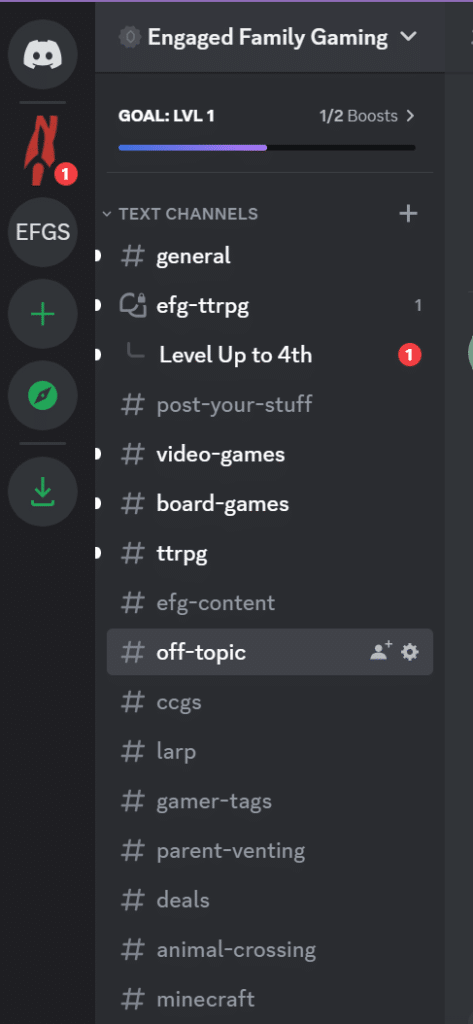
In addition to server functionality, Discord allows direct messaging and private group chats, similar to any other social messaging platform. You can give your “friends” on Discord nicknames. Since Discord users choose unique usernames and a username isn’t quite the same thing as an actual name (especially if you know that user personally). You can give your group chats special names and icons, too.
Discord also allows users to hook in and configure bots. These have a wide array of functionality depending on what users are looking for. The most common bots help with server administration by letting users self-select their roles and answer questions via “reaction emojis” to filter into private text and voice channels. Check out this list of the most common Discord bots.
One final bit on the functionality side for Discord is the plethora of integrations that hook in with Discord’s API (automatic programming interface). Users can hook in anything from social media (like Facebook) to Steam (to display which game a user is playing) and even Patreon. Users can stream a game to a Discord server much like one would to Twitch. However, it is on a much smaller, much more limited scale.
Getting Started with Discord
We could, in theory, write an entire guide just to get started with Discord, including how to use some of its functionality… but Discord’s done that for us already!
Check out the official Beginner’s Guide to Discord.
Discord’s Privacy and Safety Features
There are a number of things that parents can do to help keep their kids safe on Discord using the app’s User Settings > Privacy & Safety, you can access these important tools.
- Parents can adjust settings to restrict incoming friend requests to friends of friends or even turn them off entirely
- Parents can also set things up so that only friends can send DMs (preventing spam and potentially harmful interactions)
- Kids can block people with relative ease (similar to blocking on any other social platform)
- If content (or even an entire server) is inappropriate or goes against Discord’s Guidelines, users can report them
- And, finally, the all-important content filter to check DMs for inappropriate content.
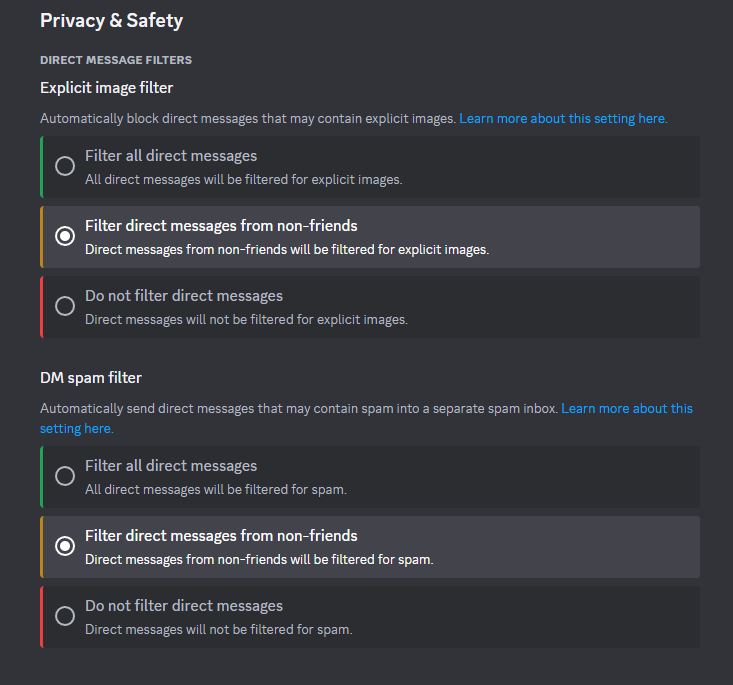
Check out Discord’s guide to safety and privacy for more detailed information.
On a user level, users can mute and deafen other people in servers so that they aren’t able to voice-interact with you, even if they’re interacting with others. This is an important feature for online gaming as things can get rather, well, heated.
Why should you let your kid use Discord?
Discord is relatively ubiquitous and incredibly accessible. It’s easy to use and it connects people of all ages from all over the world (although there are concerns there). It acts as a “third place” for kids to feel safe and connected outside of school and home, much like a physical playground or a mall might have felt to us when we were kids.
Discord’s varied community servers are a huge benefit, allowing kids to find new friends in their area(s) of interest. Kids can join a local book club for teens, their favorite streamer’s server to keep up with their content and schedule, or even create their own communities. They’ll learn the importance of online etiquette in public forums. This includes how to interact with people from different cultures and age groups (although the latter creates its own set of risks); and even how to moderate online spaces so that they remain safe and inclusive for all.
Discord’s ability to connect with others without revealing real names, phone numbers, or even locations is a big draw for kids just starting to explore the internet. They’re able to know people by their usernames and still build meaningful friendships. Kids are already connecting to one another in games and Discord is a natural technological extension of that.
The Biggest Risks of Letting Kids Use Discord

Let’s be real: there are a LOT of risks to be aware of on Discord. Those risks apply to the rest of the internet as well. This isn’t to diminish the challenges, to be clear, but being online is probably the biggest risk of all.
Being online, which extends to interacting with other humans that we as parents probably don’t know, is the scariest part of letting your kids hang out on Discord. We don’t know who is on the other side of the monitor, after all.
As an extension of this is the potential of our kids being exposed to inappropriate content (whether that’s sexual, violent, or hateful). There are ways to report it, of course, and the DM filters will help mitigate this from popping up in a child’s messages. However, filters aren’t perfect. They’re built with machine learning, which allows them to get better over time.
Potential Serious Risks
There have, of course, been large edge cases on Discord about grooming and human trafficking, and it would be folly to dismiss these concerns outright. Discord’s servers aren’t moderated by Discord itself, just the community’s mods and administrators. Grooming isn’t relegated to sexual misconduct either. Although they’ve been largely driven from the platform, large far-right and white supremacist hate groups set up shop in Discord for quite some time. These people are likely still lurking in Discord.
Children mixing with adults in Discord servers is of great concern as well. When kids talk to adults out in the world, they’re usually accompanied by a trusted adult. In Discord, there isn’t always a trusted adult to be a buffer.
Finally, there’s cyberbullying and harassment, which is probably the most prevalent concern for all parents letting their kids go online. Kids can be cruel to one another and the internet continues to be a breeding ground for hateful communication. And, unlike simply walking away from a bully at school, cyberbullying follows kids everywhere they go on the internet (and Discord is no exception).

EFG’s Discord Recommendations for Parents
It isn’t easy being a parent these days, especially with all of the technology to keep up with. So let’s recognize you, parent, for doing your best and embarking on this learning journey. It’s important and you’re doing great!
The first, and best, defense in ensuring that your child stays safe in this digital playground is keeping the lines of communication open and incredibly transparent. Talk about online behavior, appropriate (versus inappropriate) content, and spotting trouble in servers before it becomes a larger problem.
Talk with your child about who they’re talking to, as well as which servers they’re actively participating in. Have frank discussions about parasocial relationships, especially if your child is in a streamer’s Discord server. While it is okay to interact with a streamer or content creator, these people are not ever to be misconstrued as “friends” because of the parasocial nature of the relationship, as well as the likely large age gap.
Make sure that there are rules for the age group that your child is allowed to interact with. The rules can be as stringent or as relaxed as you wish. The best practice for 13-year-olds is usually interacting with other kids that are a maximum of three years age difference. However, it’s always ideal to encourage interacting with kids their own age for emotional maturity and safety concerns. Children need to be reminded that others may or may not be telling the truth about their identity. They must always proceed with caution.
Review privacy and safety settings are a fairly regular basis to ensure that your child has a bit of control over who they talk to or how.
And, finally, make sure your child understands the importance of keeping personal information (such as last names and location) private. Sharing age is fine, of course.
It’s Your House, Your Rules, Your Choice
Discord is a great connectivity tool, especially in a world where global friendships are possible to maintain. There are a great many benefits to letting your child hang out on Discord, but there are risks to mitigate to ensure that they remain as safe as they can.
Talk to your kid about all of it and do it often, which should go for any and all time spent on the internet. The scariest bits of our online culture die when they’re exposed to light… and conversation.
Ultimately, the choice is yours. You make the rules.
What do you think? Sound off in the comments and let us know your thoughts!
Make sure to keep your eyes on Engaged Family Gaming for all of the latest news and reviews you need to Get Your Family Game On!
- Video Games for kids on Xbox One
- Video Games for kids on PS4
- Video Games for kids on Nintendo Switch
- Board Games for kids
Follow us on Facebook!
Follow us on Instagram!
Subscribe to our Podcast!
About The Author